
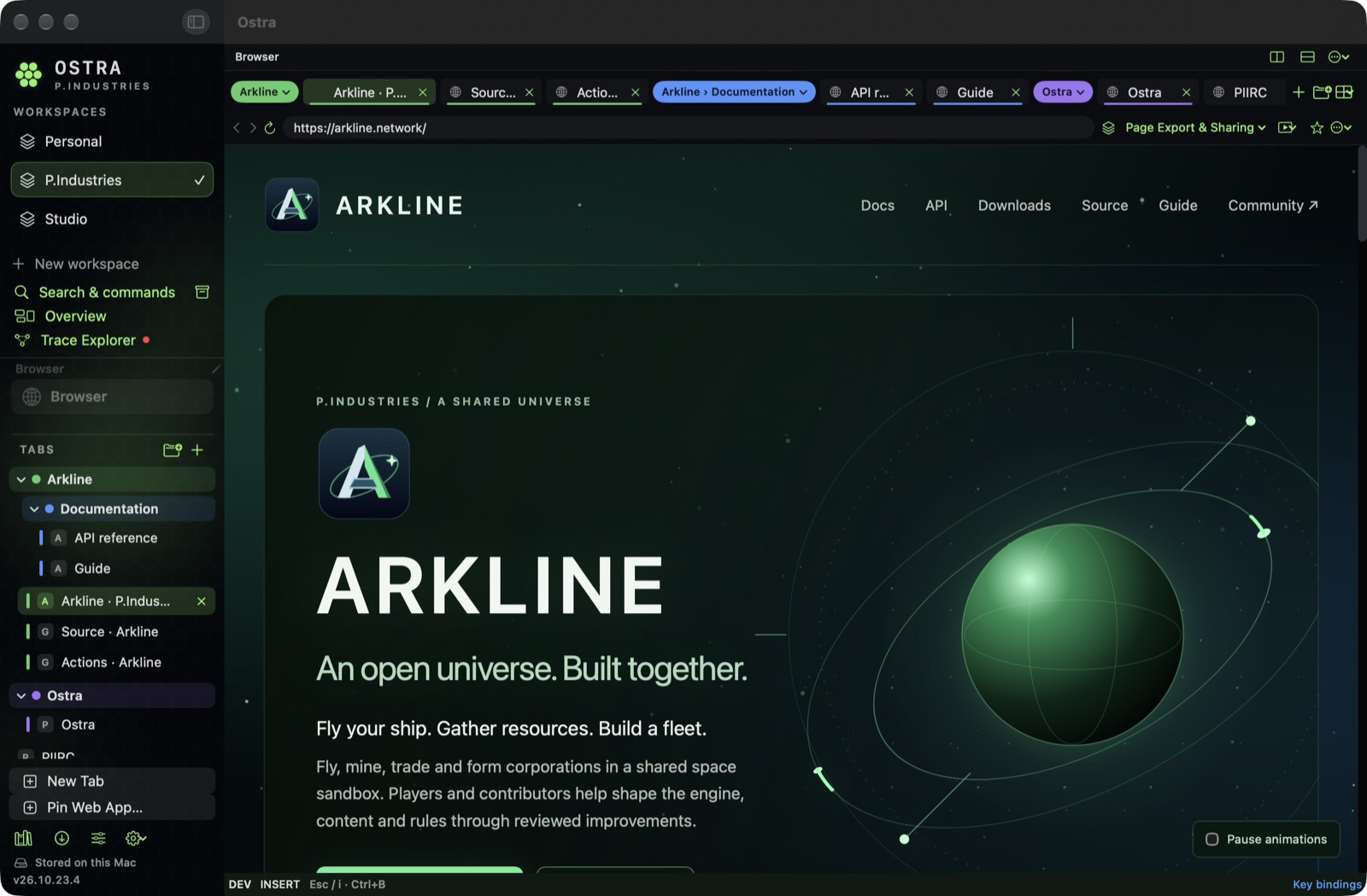
One workspace. Several projects.
We use Ostra while building our own apps. In a P.Industries workspace, that means keeping several projects open at once. For Arkline alone, there’s the marketing site, GitHub repositories, Actions runs, and API documentation. A flat row of tabs stops telling you which pages belong together.
The next update is about making that relationship visible. A workspace holds the wider context. Named tab groups organize the projects inside it. Nested groups give a busy project a little more structure, without needing another workspace for every collection of links.
Put related pages together.
In the current preview, groups appear in the sidebar and the top tab bar. You can name them, give them a color, create subgroups, and collapse the parts you don’t need. Empty groups stay available so you can organize first and add pages later.
We’re working on a direct drag-and-drop flow: drop a tab onto another to create a group and name it, or drop into the sidebar to start a new one. A faded tab and a visible destination should make the result clear before you let go.
Groups change organization, not identity. A page keeps its existing account when you organize its tab. Grouping two tabs doesn’t combine their website sign-ins.
Tools that sit beside your work.
Trace Explorer is getting a docked layout. It opens on the right so you can inspect activity alongside the page, then move it to the bottom or detach it into a window. Changing its position keeps the current trace and filters.
This is part of the same idea: let the work stay in view while you choose how much space its tools need.
What we’ve checked. What’s still ahead.
We’ve checked nested-group creation and restored group membership after restarting the preview. We’ve also exercised Trace Explorer’s docking and detaching controls. Automated checks cover group persistence, hierarchy, import and sync projection, and the default Trace docking behavior.
Physical drag-and-drop feedback and panel resizing still need a complete acceptance pass. A native pane zoom-and-restore test also needs investigation. We’ll finish those checks before treating this preview as ready for the App Store.
Password managers: still being investigated.
We want Ostra to work with the password manager you choose, including Apple Passwords and 1Password, through supported native macOS behavior. We don’t want to build another vault or require one provider.
That integration is not complete. Our exploratory 1Password test did not show native suggestions or an AutoFill menu, and Apple Passwords has not passed a separate fill test. Setup guidance is not working integration. We’re investigating the supported path and will report actual results here.
A private codebase. A public conversation.
Ostra is not open source. This journal is where we’ll share the reasoning behind changes, show real workflows, and explain limitations alongside progress. An experiment, a preview, and a released feature should be easy to tell apart.
If you use Ostra, we’d like to hear how you organize your work and where the browser gets in your way.
Send feedback →